Overview
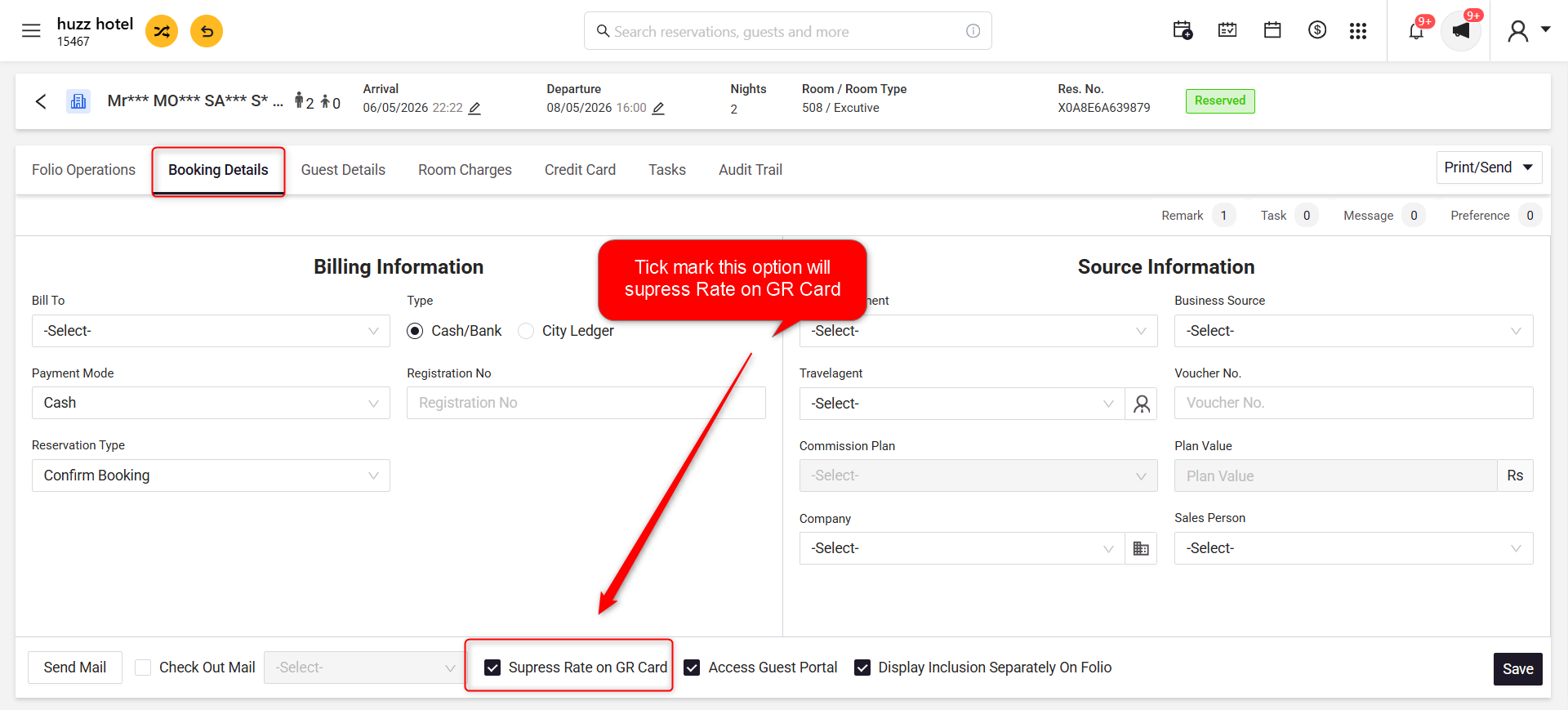
The Suppress Rate on GR Card option allows you to control whether the room tariff is displayed on the Guest Registration Card (GR Card).
This feature is useful when you want to:
- Hide room rates from guests while printing the GR Card.
- Display room rates on the GR Card when required.
- Print different GR Cards based on your property's operational requirements.
Steps to Display/Suppress Room Tariff on Guest Registration Card
- Login to PMS.
- Open the required reservation.
- Navigate to the Booking Details tab.
- Scroll to the bottom of the page.
- Locate the Suppress Rate on GR Card checkbox.
- Select or clear the checkbox based on your requirement:
- Checked – Room tariff will not be displayed on the Guest Registration Card.
- Unchecked – Room tariff will be displayed on the Guest Registration Card.
- Click Save.
- Print the Guest Registration Card.
Screenshot
Was this article helpful?
That’s Great!
Thank you for your feedback
Sorry! We couldn't be helpful
Thank you for your feedback
Feedback sent
We appreciate your effort and will try to fix the article