Overview
The Generate Invoice Number for No-Show and Cancelled Bookings setting allows the system to automatically generate an invoice number when a reservation is marked as No-Show or Cancelled.
Enabling this option helps maintain proper invoice sequencing and ensures invoices can be generated for applicable no-show or cancellation charges.
Steps to Enable Invoice Number Generation for No-Show and Cancelled Bookings
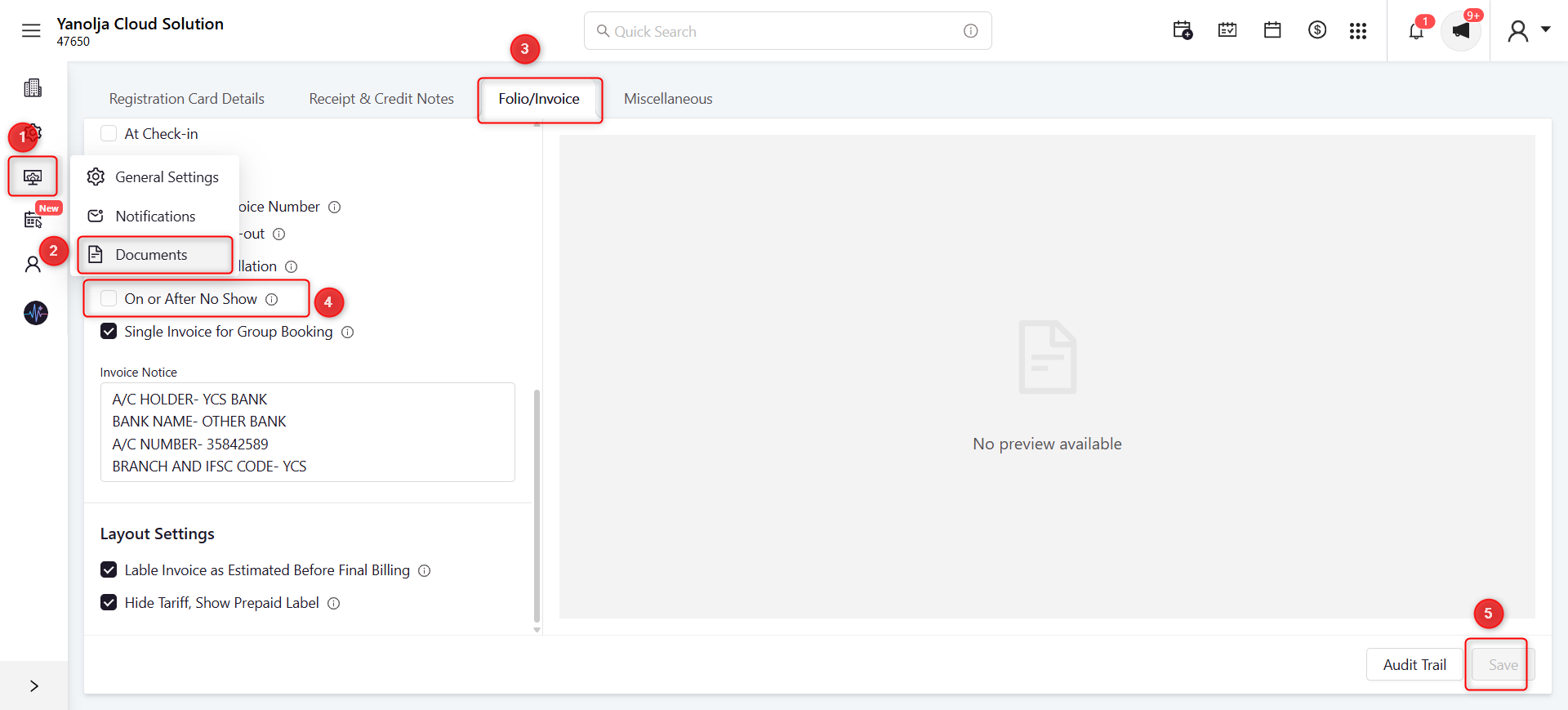
- Open Settings.
- Click Documents.
- Open the Folio/Invoice tab.
- Enable the On or After No Show option.
- Click Save to apply the changes.
Screenshot
Explanation
- Open Settings.
- Click Documents.
- Select the Folio/Invoice tab.
- Enable the On or After No Show option to allow invoice number generation for no-show and cancelled bookings.
- Click Save to apply the configuration.
Was this article helpful?
That’s Great!
Thank you for your feedback
Sorry! We couldn't be helpful
Thank you for your feedback
Feedback sent
We appreciate your effort and will try to fix the article