In PMS, once a guest arrives at the hotel on their scheduled arrival date, the Front Desk Operator must allocate a room based on their booking. This process is known as Assigning a Room in the system. If a room was not assigned at the time of making the reservation, it will appear as an Unassigned Reservation in the system.
There are several ways to assign a room in PMS:
Assigning a Room via StayView
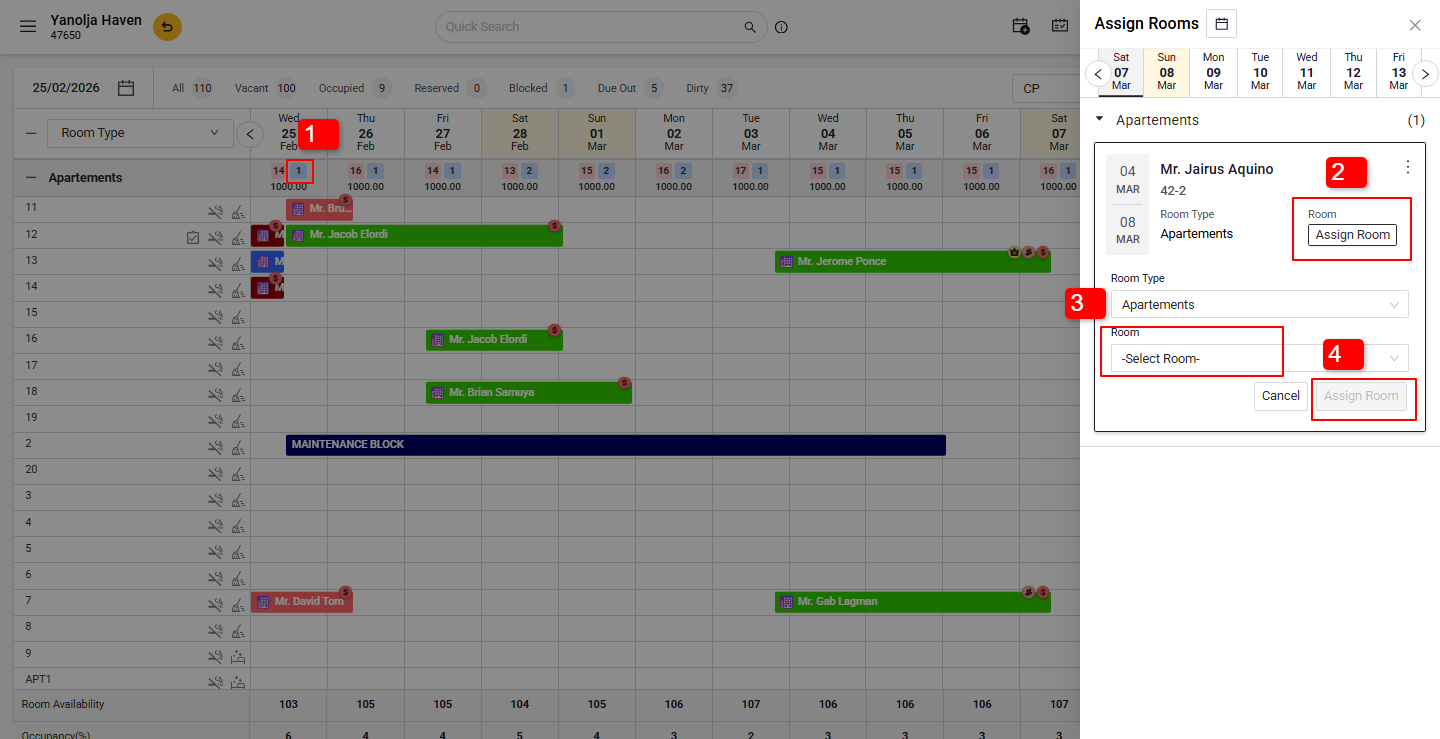
StayView provides a visual representation of your property's room status.
- Unassigned bookings appear in blue under the respective room type row.
- Click on the blue number indicating unassigned bookings.
- A window will appear where you can select and assign an available room by clicking on Assign Room.
Was this article helpful?
That’s Great!
Thank you for your feedback
Sorry! We couldn't be helpful
Thank you for your feedback
Feedback sent
We appreciate your effort and will try to fix the article