In PMS, hoteliers can track revenue generated from day-use transactions, which are bookings where guests check in and check out on the same day. This can be done through the Daily Revenue Report with specific filters.
Steps to Check Day-Use Revenue:
Access the Daily Revenue Report:
Navigate to the hamburg menu on Top left Corner (≡)
1. Go to Reports Section.
2. Select the Back Office Report Option.
3. Click on Daily Revenue Report.
4. Select the Transaction Date range.
5. Use the Reservation Type Filter and choose Day-Use to isolate day-use transactions.
6. Click Report to view the revenue details for the selected period.
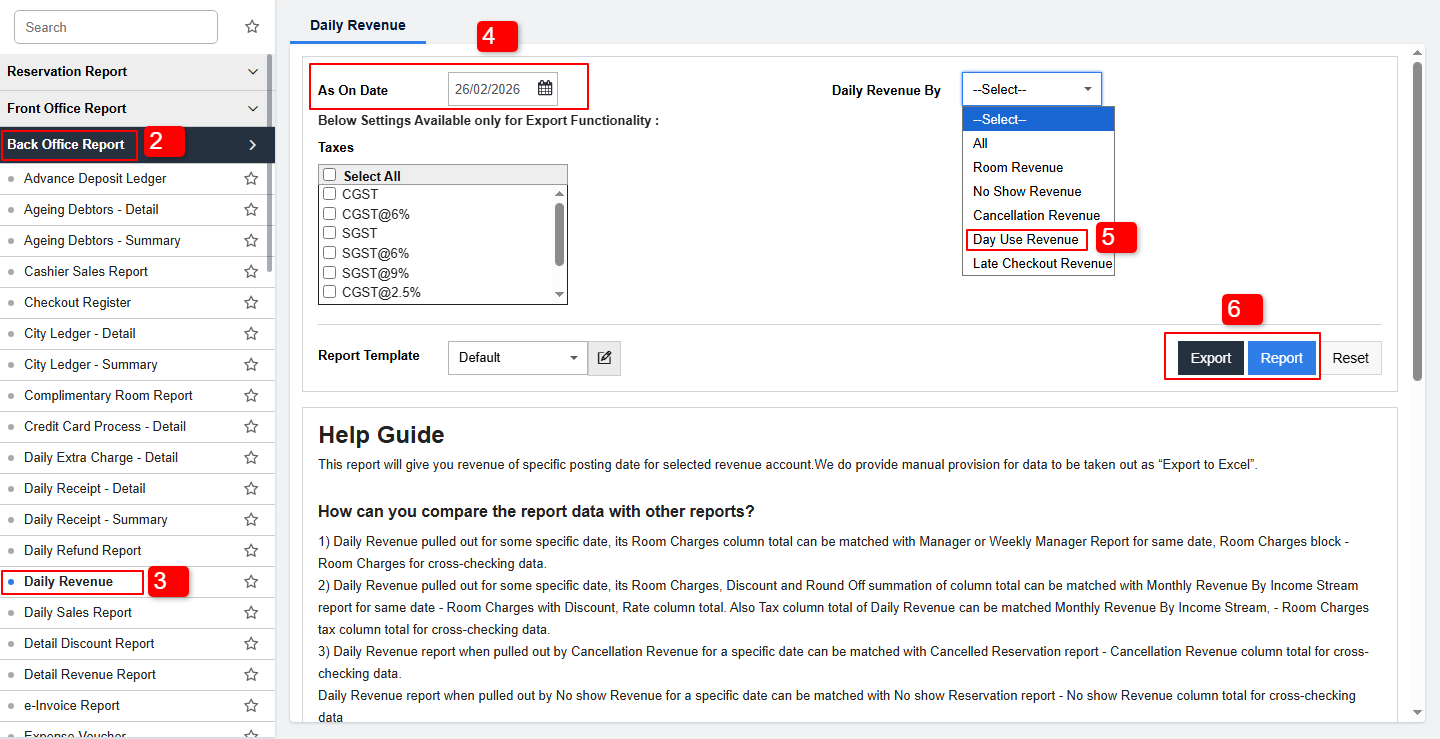
To access the Daily Revenue Report, the user must have the following privileges enabled:
Reports Access:
Navigate to PMS Configuration > User > Edit User > Privileges > Reports > Daily revenue Report.
Was this article helpful?
That’s Great!
Thank you for your feedback
Sorry! We couldn't be helpful
Thank you for your feedback
Feedback sent
We appreciate your effort and will try to fix the article