Does PMS allow managing Package Rates?
Modified on Fri, 31 Jul at 1:27 AM
Overview
Yes, PMS allows you to create Package Rates by including one or more chargeable add-ons (such as Breakfast, Lunch, Airport Pickup, Spa, etc.) within a Rate Type. You can define when the add-on should be posted, how the charge should be calculated, and its base rate. Once configured, the package charges are automatically posted to the guest folio based on the selected posting rules.
Navigation
Menu → Rate Type → Edit/Create Rate Type
Steps to Configure a Package Rate
- Login to PMS.
- Go to Menu.
- Click Rate Type.
- Open an existing Rate Type or create a new one.
- Enable Does this rate type include chargeable add-ons?
- Select the required Add-on(s) from the dropdown.
- (Optional) Enable Do you want to set rate validity & stay restrictions? if you want the package to be available only for specific dates or stay conditions.
- For each selected add-on, configure:
- Posting Rule
- Charge Basis
- Base Rate
- Click Update to save the changes.
Screenshots
Step 1: Open Rate Type
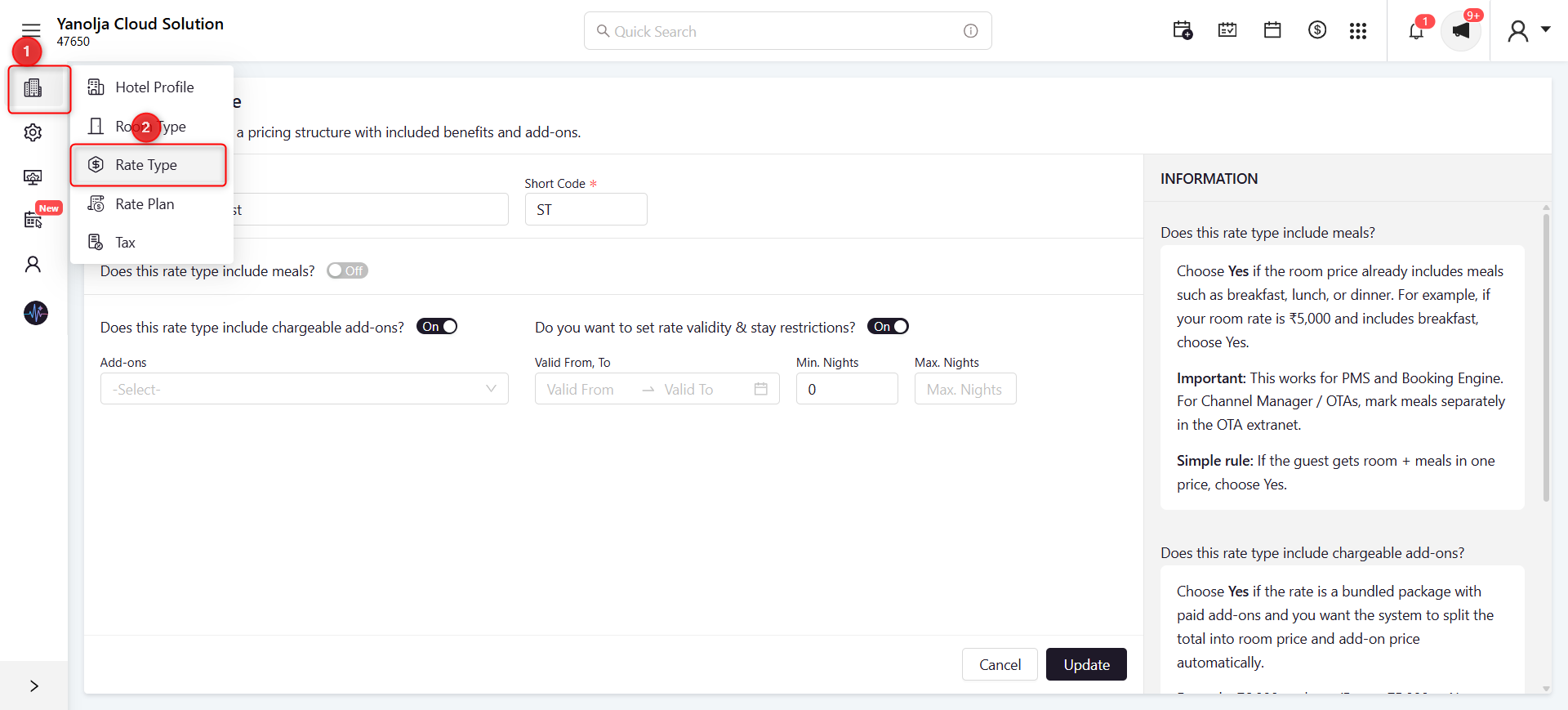
Screenshot Reference
- Open Menu.
- Click Rate Type.
- Open or edit the required Rate Type.
Step 2: Enable Package Add-ons
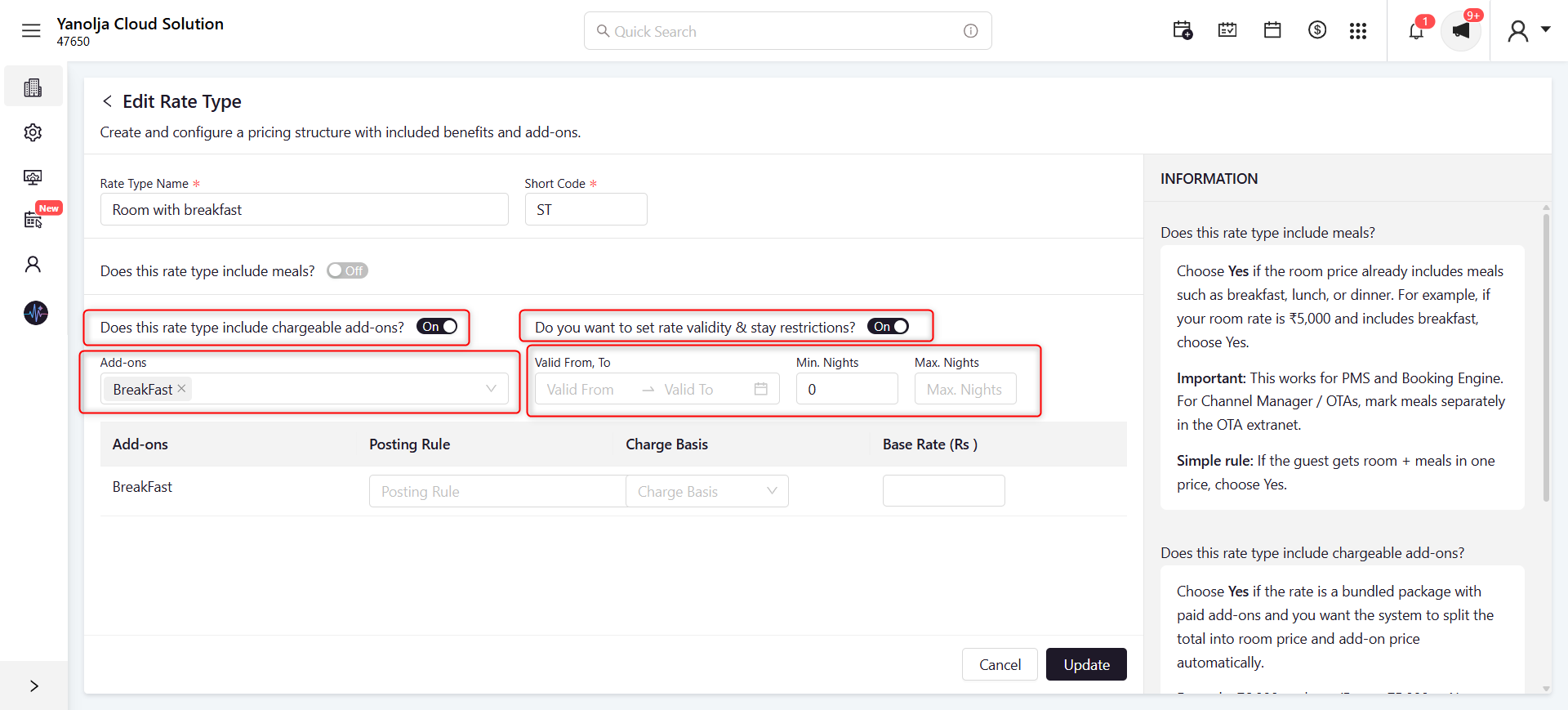
Screenshot Reference
- Enable Does this rate type include chargeable add-ons?
- Select the required Add-on(s).
- (Optional) Enable Rate validity & stay restrictions and configure the validity period.
Step 3: Configure Posting Rule
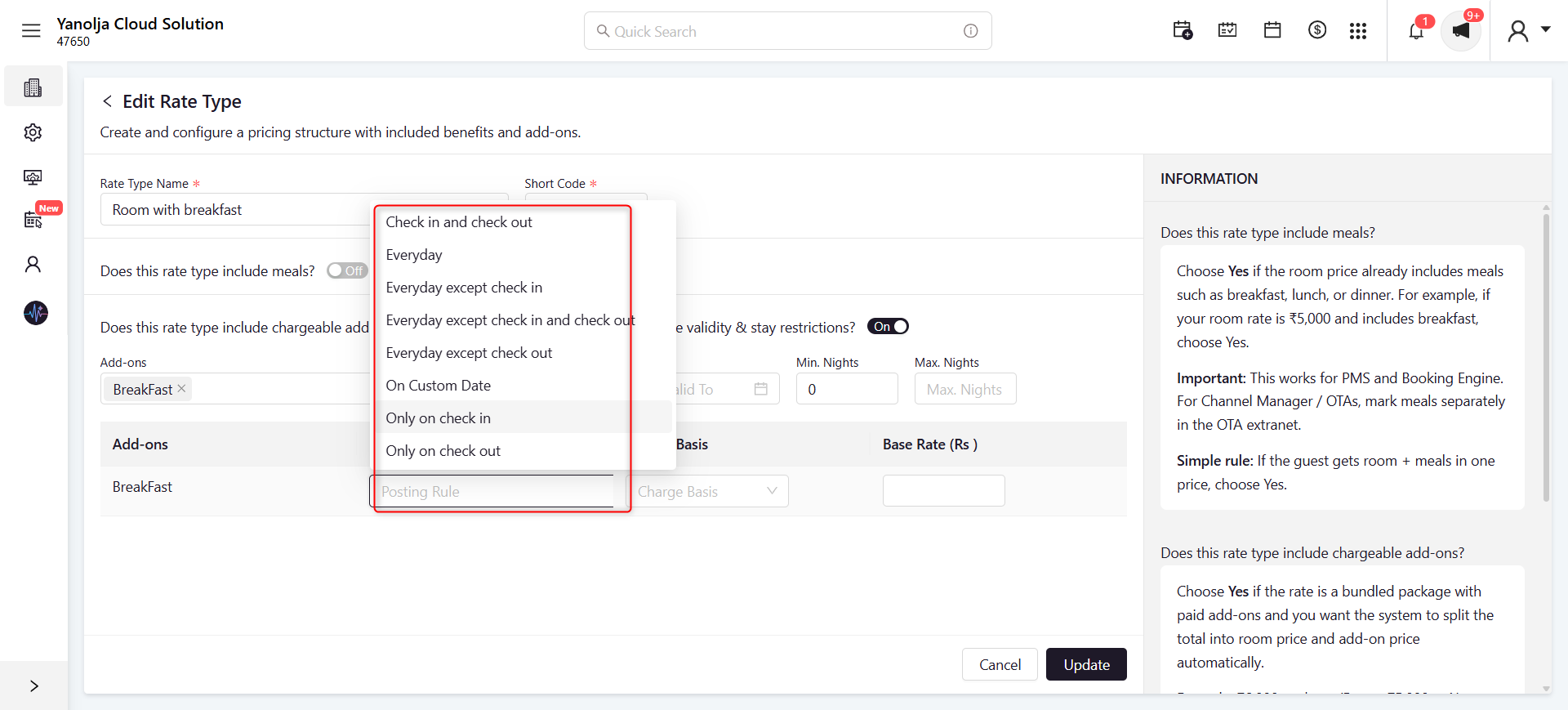
Screenshot Reference
Select the required Posting Rule for the add-on.
Available options include:
- Check in and check out
- Everyday
- Everyday except check in
- Everyday except check in and check out
- Everyday except check out
- On Custom Date
- Only on check in
- Only on check out
Step 4: Configure Charge Basis and Base Rate
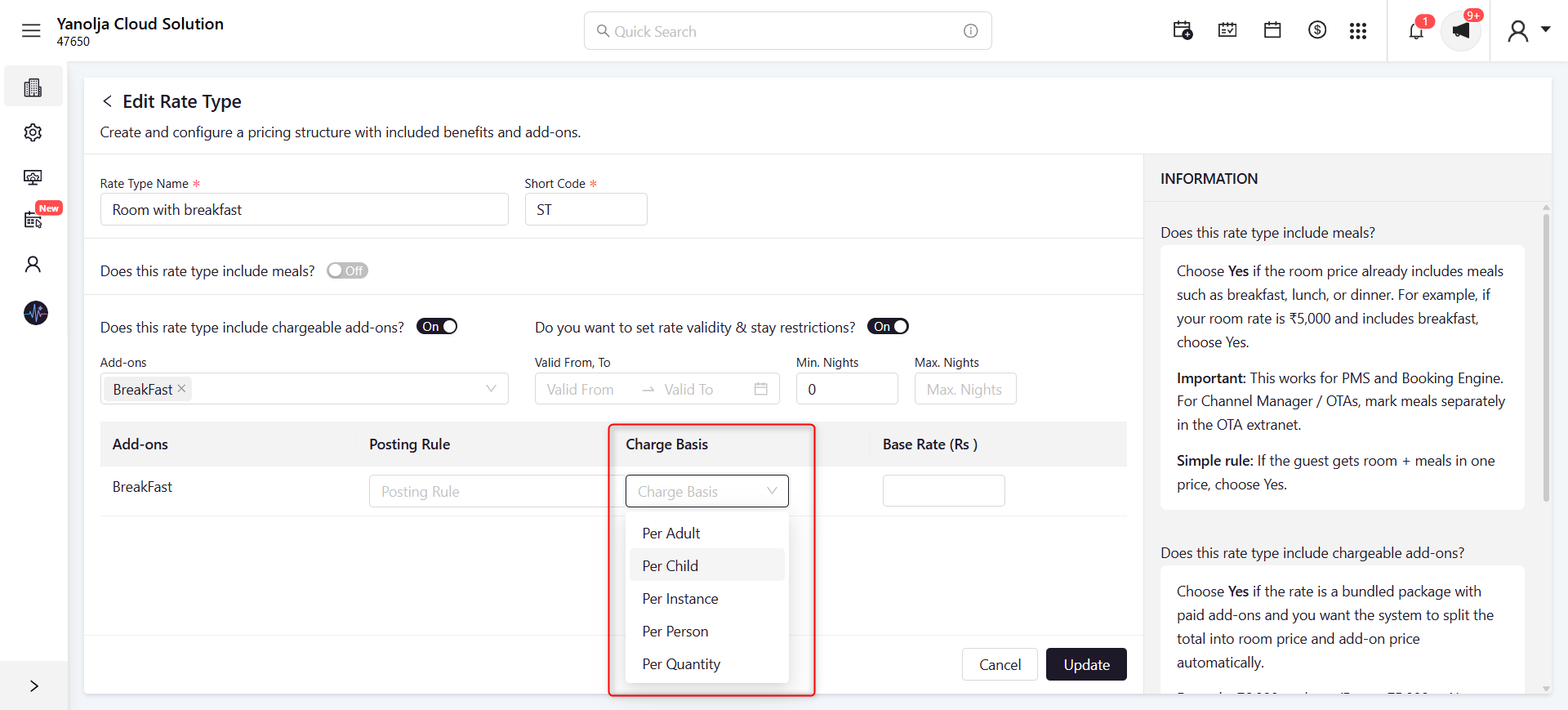
Screenshot Reference
Configure the following:
- Charge Basis
- Base Rate
Then click Update.
Step 5: Configuration Example
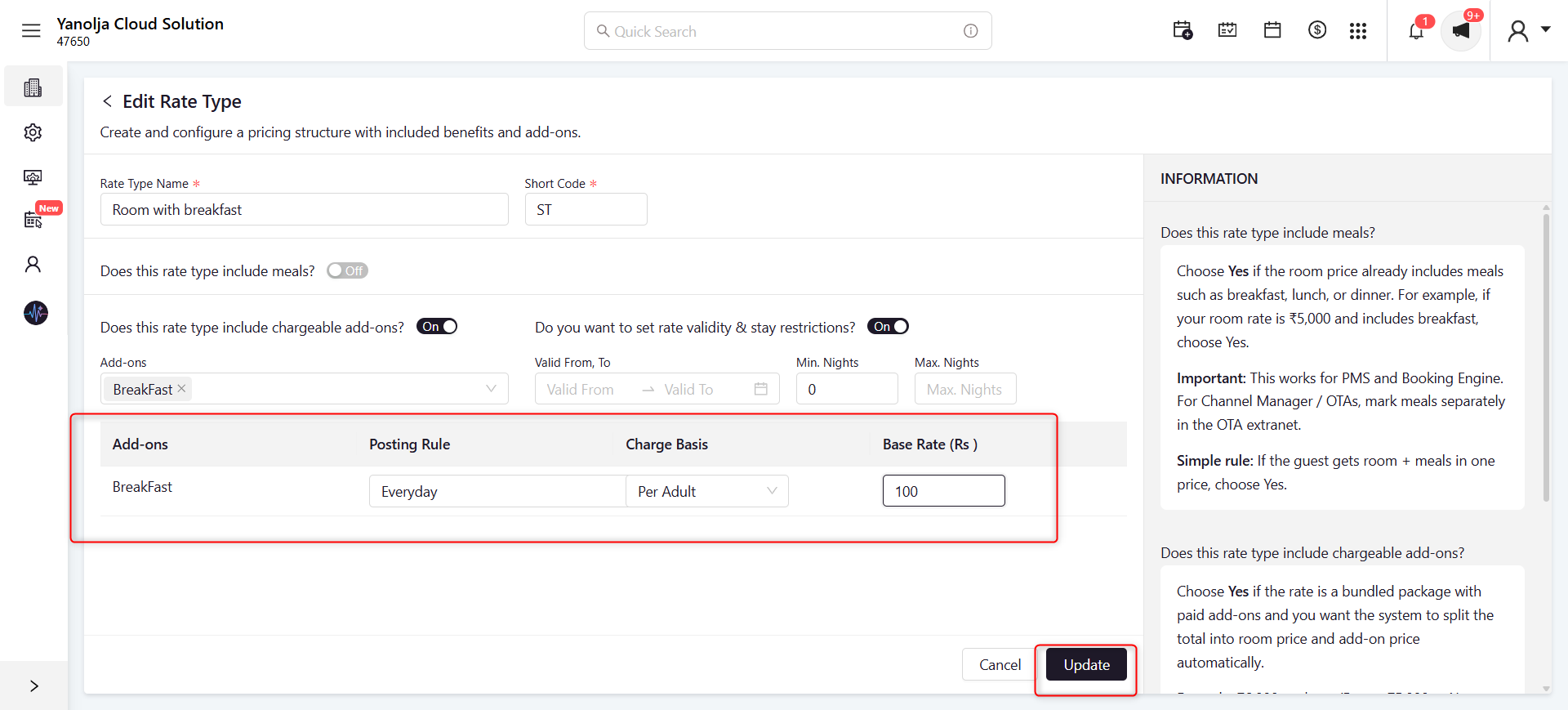
Screenshot Reference
Example configuration:
- Add-on: Breakfast
- Posting Rule: Everyday
- Charge Basis: Per Adult
- Base Rate: 100
Click Update to save the package configuration.
Step 6: Package Charge Posted in Guest Folio
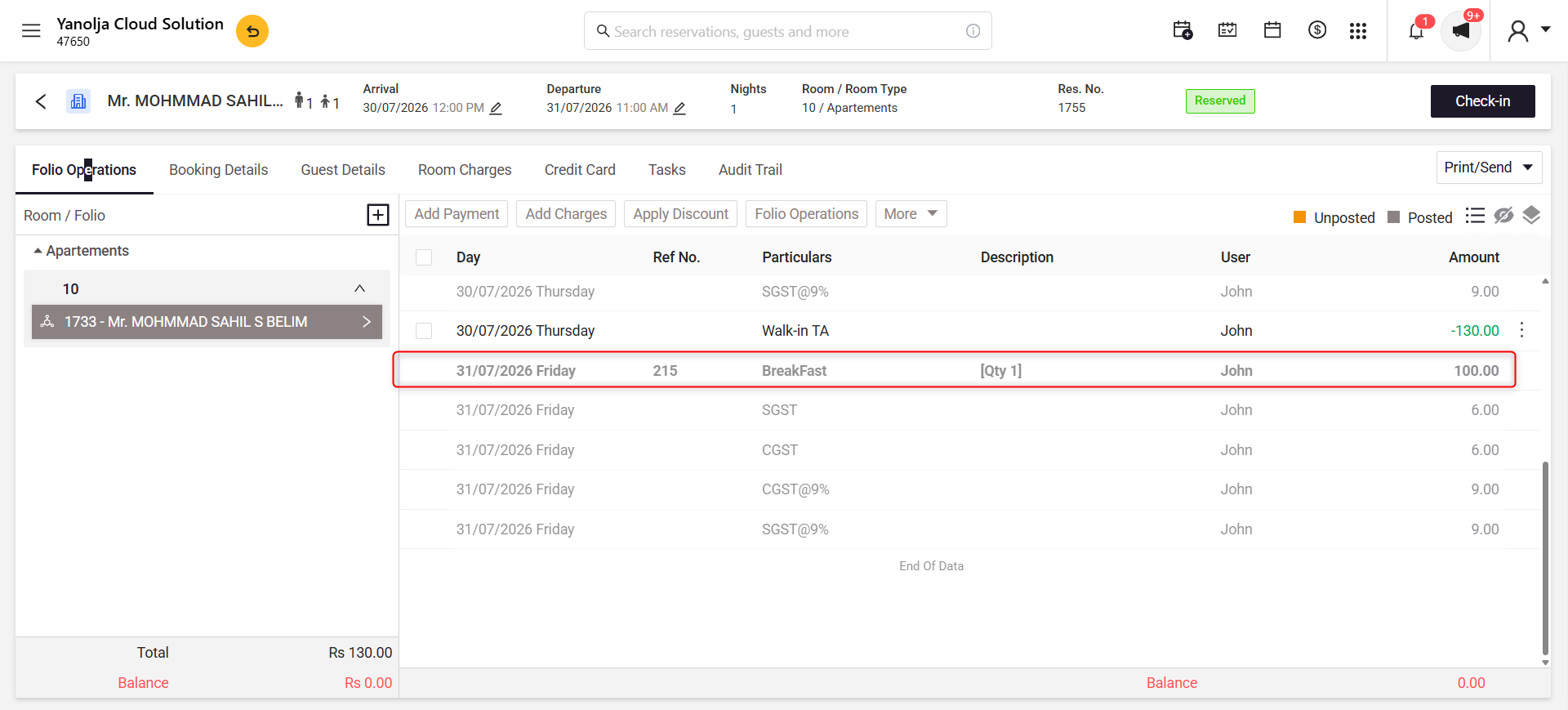
Screenshot Reference
Open the reservation and navigate to the Folio Operations tab.
The configured package add-on (for example, Breakfast) is automatically posted to the guest folio based on the configured posting rule.
Posting Rule
Defines when the add-on will be posted during the guest stay.
| Option | Description |
|---|---|
| Check in and check out | Posted on both arrival and departure dates. |
| Everyday | Posted every day of the stay. |
| Everyday except check in | Posted every day except the arrival date. |
| Everyday except check in and check out | Posted only on the stay dates between arrival and departure. |
| Everyday except check out | Posted every day except the departure date. |
| On Custom Date | Posted only on the specified date. |
| Only on check in | Posted only on the arrival date. |
| Only on check out | Posted only on the departure date. |
Charge Basis
Defines how the add-on amount is calculated.
Available options:
- Per Adult
- Per Child
- Per Instance
- Per Person
- Per Quantity
Base Rate
Enter the amount that should be charged for the selected add-on based on the configured charge basis.
Rate Validity & Stay Restrictions
Enable this option to restrict the package rate to specific travel dates or minimum/maximum stay requirements.
Example
A hotel offers a Room with Breakfast package.
Configuration:
- Add-on: Breakfast
- Posting Rule: Everyday
- Charge Basis: Per Adult
- Base Rate: ₹100
Guest Stay:
- Adults: 2
- Stay: 3 Nights
Result:
Breakfast charges of ₹200 per day (₹100 × 2 adults) are automatically posted for each day according to the configured posting rule and appear separately in the guest folio.
Was this article helpful?
That’s Great!
Thank you for your feedback
Sorry! We couldn't be helpful
Thank you for your feedback
Feedback sent
We appreciate your effort and will try to fix the article