Bill to Company/City Ledger: If the guest is from one of the companies and that company will pay the charges of the guest, in that case, the company wants a bill with its name so we can do a bill to the Company/City Ledger in eZee Absolute.
Prerequisite: Add the Company to the Database
1. Log in to eZee Absolute.
2. Navigate to Front Office > Company Database.
3. Click on Add New Company.
4. Enter the company's details.
5. Save the information.
6. If company is already added, then you can skip these steps
Assign the Invoice to the Company
1. Open the relevant reservation.
2. Click on Edit Reservation.
3. Go to Folio Operations.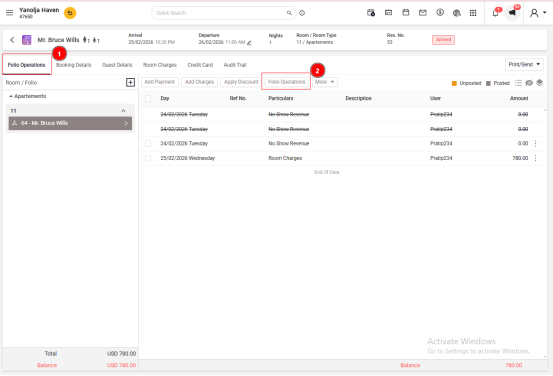 4. Select Bill To.
5. Search for and select the company.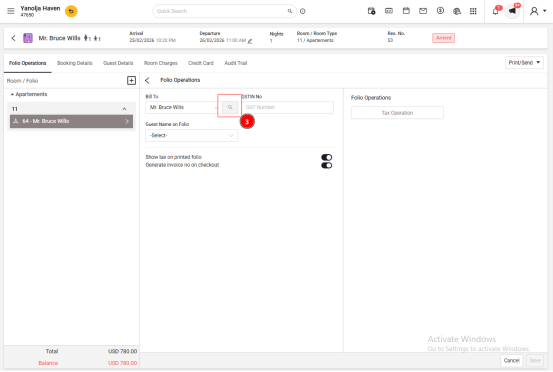 6. Confirm the selection.
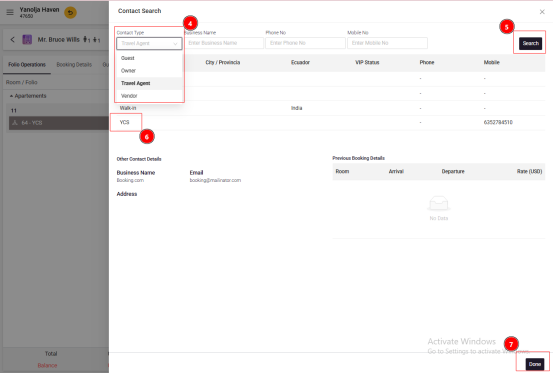 7. Save the changes.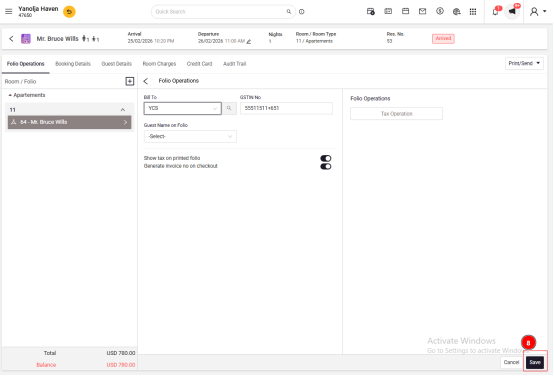
By completing these steps, the invoice will be billed to the specified company's name.
Was this article helpful?
That’s Great!
Thank you for your feedback
Sorry! We couldn't be helpful
Thank you for your feedback
Feedback sent
We appreciate your effort and will try to fix the article