Overview
The Round-Off Settings feature allows you to configure how the system rounds the final invoice amount. This helps eliminate unnecessary decimal values in invoices by applying the selected round-off method.
You can configure:
- Round-Off Type to define the rounding method.
- Round-Off Limit when using the Manual option.
- Add Up Round Off To Rates to adjust the round-off difference in the room rate instead of displaying it as a separate adjustment.
These settings are applied to invoice calculations throughout the Property Management System.
Steps to Configure Round-Off Settings
- Open Settings and navigate to the Formats section.
- Select the required Round-Off Type.
- If Manual is selected, enter the required Round-Off Limit.
- Enable Add Up Round Off To Rates if you want the round-off amount to be adjusted in the room rate.
- Click Save to apply the changes.
Screenshot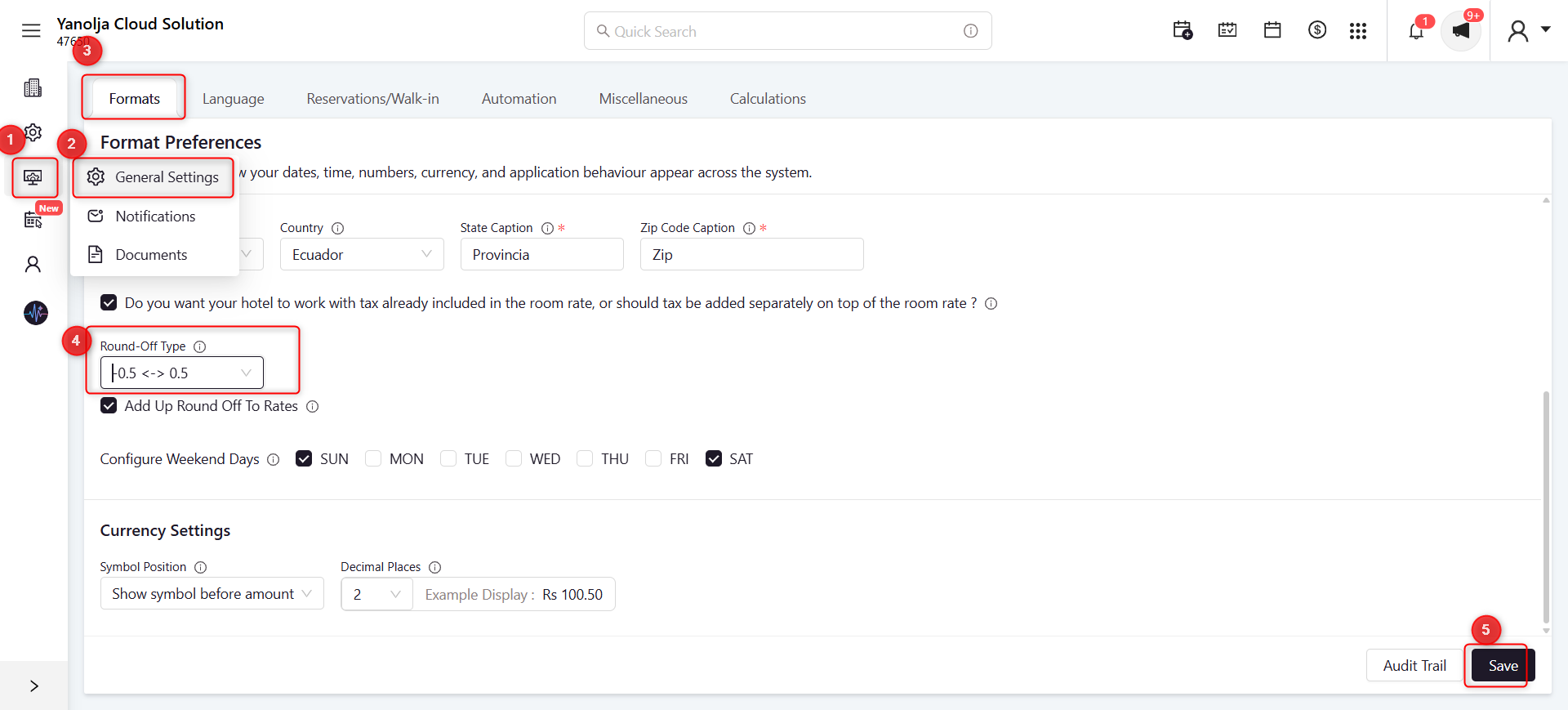
Example
Round-Off Type: -0.5 ↔ 0.5
| Invoice Amount | Rounded Amount |
|---|---|
| ₹1,250.30 | ₹1,250.00 |
| ₹1,250.50 | ₹1,251.00 |
| ₹1,250.70 | ₹1,251.00 |
Was this article helpful?
That’s Great!
Thank you for your feedback
Sorry! We couldn't be helpful
Thank you for your feedback
Feedback sent
We appreciate your effort and will try to fix the article